I migrated this blog from Ghost to Astro using only my phone
Problem
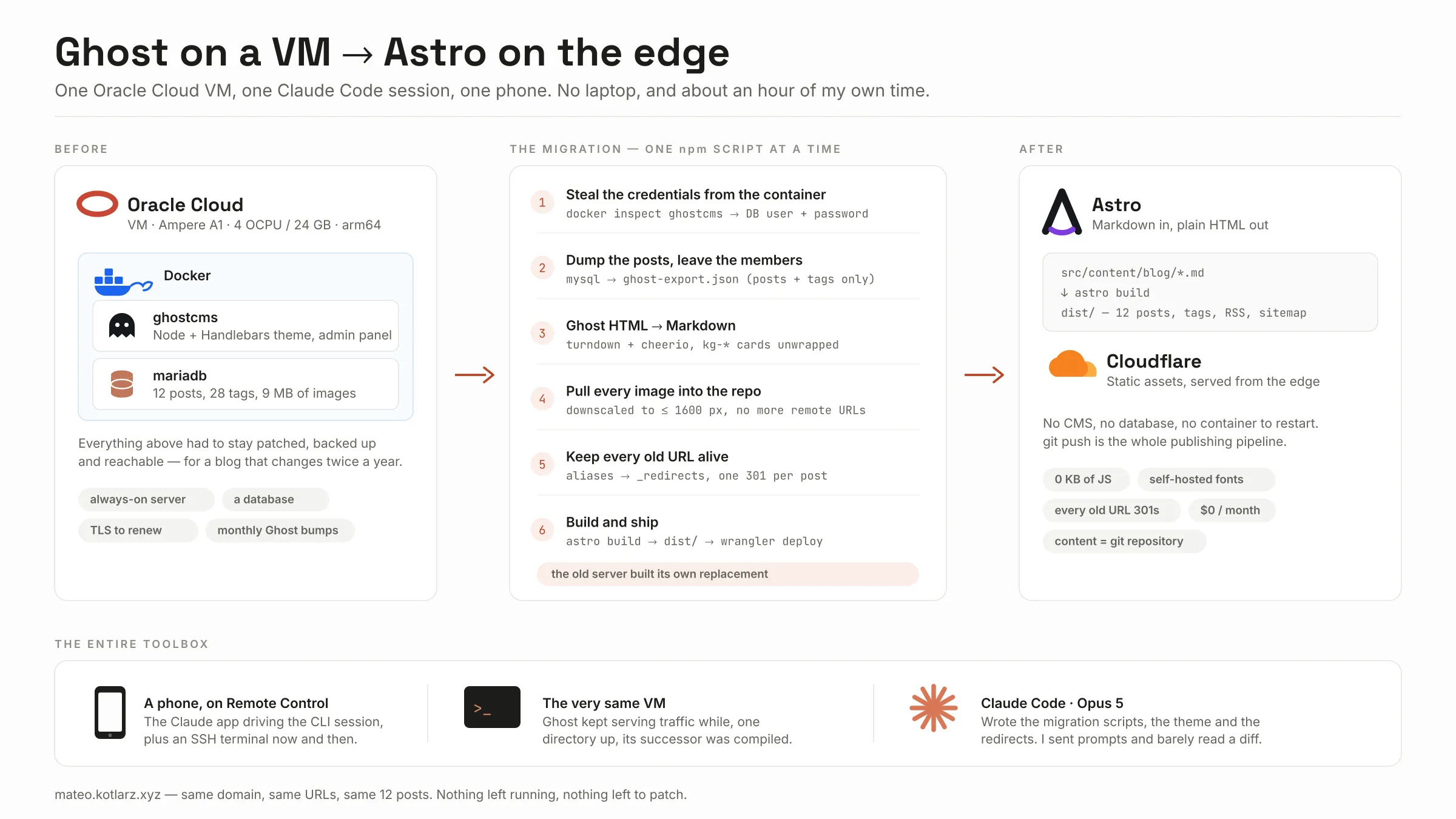
This blog was running Ghost in a Docker container on an Oracle Cloud VM, with MariaDB in a second container next to it. It worked. It also meant that for a site that gets a handful of posts a year I was permanently on the hook for a Node application, a database, TLS certificates, backups and a monthly round of docker compose pull.
That VM is not a dedicated blog server. It is my playground — remote desktop, whatever I happen to be experimenting with that month — and Ghost turned out to be a remarkably delicate neighbour. Every time I played with something unrelated on that machine, there was a decent chance Ghost would fall over and I would spend an evening restoring it. Add keeping MariaDB happy and the whole thing had a maintenance cost completely out of proportion to what it was serving.
The second problem was worse, because it stopped me writing at all. Ghost Admin on a phone is not pleasant. Every time I had an idea for a post, the thought of fighting that editor with two thumbs was enough to make me not bother. Drafts stayed in my head.
What I actually wanted was this: write posts from my phone — and preferably not even write them myself, but describe what happened and have an AI turn it into an article while I supply the input and the corrections.
Solution
Turn the whole thing into files.
The blog is now an Astro site. Posts are Markdown files in a git repository, the build produces plain HTML, and the HTML sits on Cloudflare as static assets. Same domain, same URLs, same posts. git push is the entire publishing pipeline.
Cloudflare was not a hard decision. My dad’s site has been sitting on Cloudflare Pages for a while now and it has been completely uneventful — it just serves, and I never think about it. Wanting the same relationship with my own blog was most of the argument.
The constraint: there was no computer
Here is the fun part. I did all of this without a computer.
Claude Code was already installed on the OCI VM — the same machine hosting Ghost. What made the whole thing possible on a phone is Remote Control: the CLI session keeps running on the server, and you drive it from the Claude app. No fighting a 6“ screen with a shell — I open the app, type a prompt, put the phone back in my pocket. When I did need to poke at something directly, an SSH terminal was one app away, but that turned out to be rare.
So the entire setup was:
- a phone — the Claude Android app on Remote Control, with an SSH terminal for the occasional manual check,
- the OCI VM — Ampere A1, 4 OCPU, 24 GB RAM, arm64, running the blog it was about to make redundant,
- Claude Code (Opus 5) — writing the migration scripts, the Astro theme and the redirect logic.
Because the session lives on the server, nothing depends on the phone staying connected. I could send a prompt, lose signal, come back two hours later and read what had happened. Ghost kept serving traffic the whole time. One directory up from the container volumes, its replacement was being compiled.
Technical details & puzzles
Getting the content out without a browser
Ghost’s official export lives in Ghost Admin, behind a logged-in browser session. Since the whole point was to avoid touching Ghost Admin on a phone ever again, that was not happening.
But the data is one mysql call away, so instead of the admin UI I went at the database directly. The credentials were already on the machine — inside the container definition:
docker inspect ghostcmsThat gives you the database__connection__* environment variables Ghost was started with, so no password ever had to be typed or stored in the repo. A script reads them, runs the queries inside the mariadb container and writes out a JSON file shaped exactly like a Ghost Admin export:
npm run dump-ghost -- import/ghost-export.jsonIt dumps only posts, tags and the join table between them. Members, users and settings are deliberately left out — this file lands in a working tree, and subscriber e-mail addresses have no business being there. The import/ directory is in .gitignore for the same reason.
__GHOST_URL__
First surprise. Every image reference in the exported HTML looked like this:
__GHOST_URL__/content/images/2025/01/1000026262-1.pngGhost stores its own base URL as that placeholder so a site can be moved between domains without rewriting the database. Perfectly sensible, completely baffling for ten minutes when your image downloader keeps reporting ENOTFOUND __ghost_url__. The migration script swaps it for the real address before it touches anything.
Ghost HTML → Markdown
Ghost wraps content in its own kg-* card markup: figures with captions, bookmark cards, embeds, code blocks with the language on a child <code> element, and images that lazy-load through srcset. Feed that straight into a HTML-to-Markdown converter and you get a mess of nested divs.
The conversion uses turndown with the GFM plugin for tables and strikethrough, plus cheerio to clean up first, with custom rules for the Ghost-specific bits:
figure+figcaptionbecomes an image followed by an italic caption line,kg-bookmarkcards collapse to an ordinary link,- code blocks keep their language so Shiki can highlight them at build time,
- upgrade CTAs, navigation and other theme furniture are dropped.
Images
Every image was pulled out of Ghost’s content/images tree and into src/content/blog/images/<slug>/, with the references rewritten to relative paths. Anything wider than 1600 px got downscaled on the way in.
This matters more than it sounds. Because the files now live next to the Markdown and are declared in the content schema, Astro puts them through its asset pipeline — resized WebP in several widths, with intrinsic dimensions in the HTML so nothing jumps while the page loads. Images in public/ are copied verbatim and get none of that. 9 MB of originals, and the reader downloads a fraction of it.
Not breaking every link on the internet
Ghost served posts at /<slug>/. Astro serves them at /blog/<slug>/. That is the kind of change that quietly deletes years of search rankings.
So the migration writes the original path into an aliases field in each post’s frontmatter, and a build integration turns those into a _redirects file that Cloudflare honours:
/im-back/ /blog/im-back/ 301One 301 per post, generated at every build, never maintained by hand. /rss/ and /feed/ point at /rss.xml for the same reason.
The one deploy that actually broke
This one earned itself a permanent guard in the codebase.
Astro’s <Image> component behaves differently depending on how a page is rendered. Pre-rendered, it emits real files under /_astro/. Server-rendered, it emits /_image?href=… — a URL that an on-demand endpoint answers at runtime.
At some point a Cloudflare adapter made its way into the build. An adapter switches Astro to SSR, so every image on the site turned into a request to /_image?href=…. There is no server in this deployment — it is a directory of files — so nothing answered. The build was green. The deploy succeeded. Every single image on the live site returned 404, and the only way to find out was to open it in a browser.
Two things changed after that. astro.config.mjs now states output: 'static' explicitly, with a comment explaining that it is load-bearing rather than decorative. And a small build integration walks the generated HTML and fails the build if it finds even one reference to /_image:
Build is not fully static: 14 page(s) reference the /_image endpoint,
which this deployment does not serve.
A red build instead of a silent 404. Much better.
Fonts, JavaScript and other things that are not there
Since I was rebuilding the front end anyway, I took the opportunity to remove things:
- No JavaScript, except the theme toggle. That is the whole client-side bundle.
- No Google Fonts. Inter, Space Grotesk and JetBrains Mono are subset, self-hosted from
/fonts/and cached forever. No third-party connection when someone reads a post. - No dashboard configuration.
wrangler.jsoncdescribes the deployment,public/_headerscarries the security headers and cache rules. If the Cloudflare project disappeared tomorrow, the repository still knows how the site is meant to be served.
The part where I admit I reviewed nothing
Let me be honest about this, because it is the least defensible thing here: I did not read the code.
Claude Code wrote thousands of lines — migration scripts, layouts, the content schema, the redirect integration, the whole stylesheet — and I reviewed approximately none of it line by line. This was full YOLO mode. Not because I think that is good practice, but because I did not have the time, and the alternative was the migration not happening at all for another two years.
What made that acceptable to me was the shape of the problem rather than any discipline on my part. The source of truth was still safe: Ghost was untouched and still running, the database was read-only from the script’s point of view, and everything new was landing in a fresh git repository. The worst realistic outcome was throwing the directory away.
So instead of reviewing diffs I reviewed progress. Every few hours I checked where it had got to, looked at the result rather than the code, and wrote the next batch of prompts. That is also why the /_image incident above got as far as production — although in fairness, that one was invisible in the diff too. It needed a browser to spot it.
Result
- 12 posts, 28 tags and every image are now Markdown and files in a git repository.
- Zero containers, zero databases, zero servers involved in serving this page to you.
- Every old Ghost URL still resolves, with a 301.
- Hosting cost went from “a VM I have to think about” to nothing.
- Publishing is
git push. - Total hands-on time: under an hour. Spread across a weekend, in five-minute chunks.
The VM is still there — it is my playground and my remote desktop — but it no longer runs this blog. Which is the point: I can now break whatever I like on that machine without taking the blog down with it. The nice irony is that it built its own replacement.
Story
I had been thinking about this migration for a long time. The trigger was never a single dramatic outage — it was the accumulation: Ghost falling over whenever I touched something else on that VM, another restore, another database to look after, and an admin panel that made writing from a phone unpleasant enough that I simply stopped writing. Meanwhile my dad’s site had been sitting on Cloudflare Pages for months, doing absolutely nothing interesting, which is the highest praise you can give hosting.
What finally made it happen was mundane: I am in the first month of a Claude Pro subscription with a raised limit, and I decided I should actually use it.
The weekend we were at my in-laws’. There was no chance of sitting down at a desk for a few hours, and honestly no desire to. So I did it in the gaps. A prompt while the kettle boiled. A prompt in the bathroom — which, let’s be honest, is where a suspicious share of this blog’s infrastructure decisions now get made. Then nothing for two or three hours, then a look at the progress and the next batch of prompts.
That is the part I still find slightly ridiculous. Adding up the time I actually spent on this, it is under an hour. Writing the migration script alone — Ghost’s HTML, the kg-* cards, images, redirects — would have taken me a solid week of evenings a few years ago, and I probably would have abandoned it halfway, like I abandoned the two drafts that sat unfinished in Ghost for four years. Opus 5 did genuinely excellent work here, and it did it while I was making small talk over dinner.
And the actual goal is met: I can write from my phone now. In fact this post was written the way I wanted all of them to be written — I described what happened, and the article came back. I supplied the corrections.
If you are self-hosting a CMS for a blog that changes twice a year, I would genuinely think about this. Not because Ghost is bad — it is excellent — but because a folder of Markdown files does not need patching, does not have a database, and does not resent you for experimenting on its server.
Diagram made with Claude Code. So was most of the site, honestly.